Tampilkan postingan dengan label Converter. Tampilkan semua postingan

Selasa, 03 September 2013

Freemake Video Converter 4.0.4.0

Free Download Freemake Video Converter Full Version 2013. Freemake Video Converter adalah aplikasi convertor yang dapat mengkodekan beberapa video dan beberapa format ke ekstensi lainnya yang mencakup AVI, MP4, MPEG, WMV, 3GP, DVD, HD, MKV, MP3, WMA, FLAC format dan masih banyak lagi yang lainnya.

Aplikasi ini juga didukung dengan antarmuka yang sangat intuitif dan menarik. Anda juga dapat melakukan "drag and drop" untuk menambahkan file yang akan di convert ke dalam antrian, Anda dapat melihat thumbnail, total waktu dan pengaturan audio / video, serta preview video dalam media player eksternal.

Anda juga dapat menyandikan file ke AVI, MP4, WMV, DVD, MP3, Apple, Blu-ray dan profil lain, dan dengan demikian, Anda dapat mengkonfigurasi ukuran frame, lebar dan tinggi, penyesuaian, video codec, frame rate dan bitrate, serta codec pilih audio, saluran, tingkat frekuensi sampel dan bitrate.


Apa Yang Baru pada Freemake Video Converter 4.0.4.0?
- Ditambahkan mekanisme update otomatis untuk Vevo Download YouTube yang memungkinkan untuk memperbaiki Vevo Download YouTube tanpa instalasi ulang perangkat lunak dengan pengguna akhir
- Peningkatan stabilitas Blu-ray dan DVD ISO penciptaan
- Fixed masalah dengan MKV True HD Audio
- Peningkatan stabilitas konversi dengan MPEG4 dan FLV codec untuk preset: untuk MP4, FLV, untuk Android, untuk SWF, Nokia dan beberapa preset perangkat untuk Samsung dan BlackBerry
- Peningkatan stabilitas pemain
- Peningkatan stabilitas konversi dengan menggunakan percepatan DXVA
- Peningkatan kecepatan pembukaan DVD
- Tetap masalah dengan "Gabung" pilihan ketika mengkonversi ke Blu-ray ISO
- Fixed masalah dengan keluar audio sinkron dengan video saat "Join" dan "Transisi Fade" yang
- Fixed masalah dengan DVD, konversi Blu-ray ketika "Join" dan "Transisi Fade"


Judul
: Freemake Video Converter 4.0.4.0
Nama file
: FreemakeVideoConverter_4.0.4.0.exe
File size
: 26.96MB
OS
Windows
Bahasa
: Multi bahasa
Lisensi
Author
: Gratis
: Ellora Assets Corporation (www.freemake.com)


Untuk Mulai mendownload  Freemake Video Converter 4.0.4.0 Klik pAda link di bawah !

Freemake Video Converter 4.0.4.0

Minggu, 19 Mei 2013

AVS Document Converter 2.2 + Patch

AVS Document Converter 2.2 akan membantu temen-temen dalam urusan file-file kerjaan atau tugas nih temen-temen.
Dengan AVS Document Converter 2.2 ini temen-temen bisa meng-convert file document ke beberapa format seperti .PDF, . DOC, .DOCX, .HTML, .IMG, .TXT ataupun .ODT.
Bukan itu saja temen-temen, AVS Document Converter 2.2 ini memiliki feature untuk membuat watermark pada sebuah file
dokumen, mungkin ada temen-temen yang karya dokumen nya tidak ingin dibajak.. hehehehe
Ayoo dicoba.. cuma 30 MB kok,,, heheheeh


Convert Various Document Formats
Convert your files between DOC, PDF, DOCX, RTF, TXT, HTML, etc. Convert PDF format to the light-weight DOCX. See a list of supported text formats.
Work with E-books Formats
Transfer regular text formats to e-Pub format and create your own e-books easily. Open and convert such e-book formats as DjVu and FB2 to all key formats supported by AVS Document Converter.
Protect Your Documents
Create password and protect your PDF-docs. Apply restrictions for editing, copying or printing your document by the recipients. Or identify your files with a personal watermark.
Zip Your Files
Compress your bulky files to ZIP format before or after the data conversion. Password the output archive and attach it to your e-mail directly in AVS Document Converter interface.
Adjust Documents for Web Publishing
Convert your documents to HTML format and publish them as a Web page.
Multilingual Support
AVS Document Converter interface and tech-support are available in English, French, German, Spanish, Italian, Japanese and Russian.
See a full list of service utilities included into the installation.

Minimum System Requirements
Processor:  AMD / Intel Core 2 Duo compatible at 3 GHz or higher
RAM:  2 GB or higher
Administrative permissions for program installation and activation
Internet connection to activate

Windows 8/Windows 7 Recommended System Requirements
Processor:  AMD / Intel Core 2 Quad compatible at 2.4 GHz or higher
RAM:  3 GB or higher
Video:  Windows 8/Windows 7 compatible video card
Sound:  Windows 8/Windows 7 compatible sound card

Note: System requirements may differ depending on the Windows 8/Windows 7 version installed and increase when Windows Aero interface is enabled.


Download :
Installer + Patch :
Download AVS Document Converter 2.2 + Patch (30 MB)
Via IDWS | Via RGh
Password
Harus Diketik
 
Patch Only :
Download Patch AVS Product (1,5 MB)

Tested by me (Windows 7 Ultimate 32-bit) Worked
Posted by Admin Okky

Kamis, 16 Mei 2013

7-Zip

Maaf ya temen-temen baru bisa posting lagi.. baru ada koneksi.. hehehhe :D
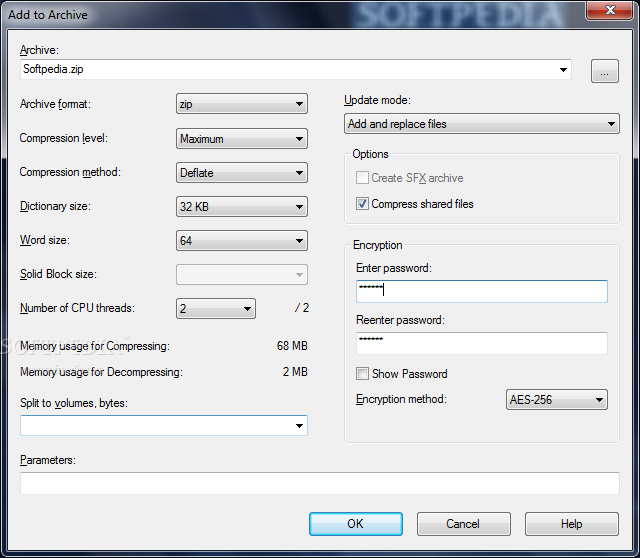
7-Zip atau yang biasa dikenal dengan 7z ini merupakan sebuah software kompresi yang tidak kalah dengan WinRAR
ataupun Winzip. 7-Zip ini open
source alias gratis temen-temen.. heheheh
Seperti software kompresi lainnya, 7-Zip ini juga support dengan semua format file kompresi seperti .rar, .zip
atau juga .7z yang merupakan format asli dari 7-Zip ini. heheh
Yuu dicoba.. :)


7-Zip is open source software. Most of the source code is under the GNU LGPL license. The unRAR code is under a mixed license: GNU LGPL + unRAR restrictions. Check license information here: 7-Zip license.
You can use 7-Zip on any computer, including a computer in a commercial organization. You don't need to register or pay for 7-Zip.

The main features of 7-Zip

  • High compression ratio in 7z format with LZMA and LZMA2 compression
  • Supported formats:
    • Packing / unpacking: 7z, XZ, BZIP2, GZIP, TAR, ZIP and WIM
    • Unpacking only: ARJ, CAB, CHM, CPIO, CramFS, DEB, DMG, FAT, HFS, ISO, LZH, LZMA, MBR, MSI, NSIS, NTFS, RAR, RPM, SquashFS, UDF, VHD, WIM, XAR and Z.
  • For ZIP and GZIP formats, 7-Zip provides a compression ratio that is 2-10 % better than the ratio provided by PKZip and WinZip
  • Strong AES-256 encryption in 7z and ZIP formats
  • Self-extracting capability for 7z format
  • Integration with Windows Shell
  • Powerful File Manager
  • Powerful command line version
  • Plugin for FAR Manager
  • Localizations for 79 languages

Download :

For (32-bit) :
Download 7-Zip for (32-bit) (1 MB) : Via IDWS | Via RGh
Password
Harus Diketik
 
For (64-bit) :
Download 7-Zip for (64-bit) (1 MB) : Via IDWS | Via RGh
Password
Harus Diketik

Tested by me (Windows 7 Ultimate 32-bit) Worked
Posted by Admin Okky

Kamis, 02 Mei 2013

DivX Plus 9.1.1 + Keygen

DivX Plus 9.1.1 ini merupakan sebuah software yang biasa digunakan untuk menonton film-film yang berkualitas bagus dan besar, seperi file film yang berekstensi MKV, AVI, MOV, dll.
Buka hanya untuk menonton saja, DivX Plus 9.1.1 ini juga bisa digunakan untuk meng-convert file film ataupun video.
Pokoknya cocok banget deh buat temen-temen yang hobby nonton film yang
berkualitas bagus. hehehe
Ayoo silahkaaan download.. :D


DivX Plus® Software lets you convert video between popular formats and enjoy an enhanced playback experience across all your devices, at home and on the go. New in this version:
  • Free conversion to DIVX and MKV using Converter and third-party tools
  • Two new MP4 profiles let you convert video for iPhone® and iPad®
  • Video Streaming to DLNA-compatible devices
Buy the new MPEG-2/DVD Plug-in to back up your personal DVDs and convert MPG, TS, VOB and SVCD files.

System Requirements of DivX Plus Player 9.1.1
  • Windows XP
  • Windows XP x64
  • Windows Vista
  • Windows Vista x64
  • Windows 7
  • Windows 7 x64
  • Windows 8
  • Windows 8 x64
Download :
Installer + Keygen :
Download DivX Plus 9.1.1 + Keygen (72 MB)
Via IDWS | Via SB
Password
Harus Diketik

Keygen Only :


Tested by me (Windows 7 Ultimate 32-bit) Worked
Posted by Admin Okky